Hilary Portrait
đź‘‹

About Me

My Projects

Active Directory Lab

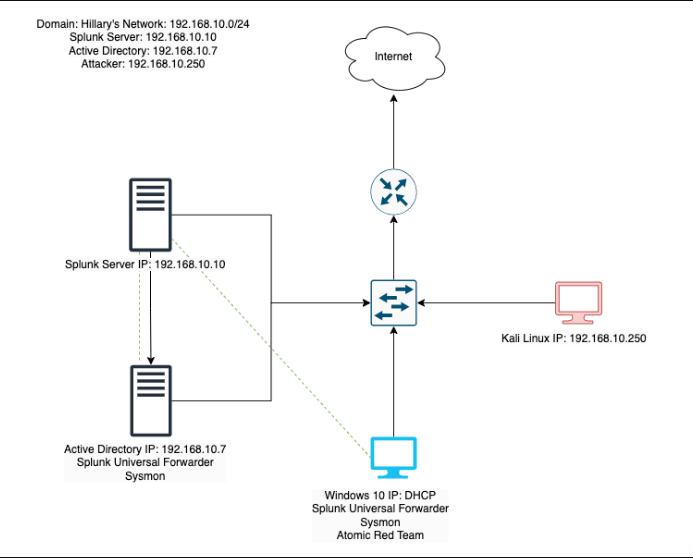
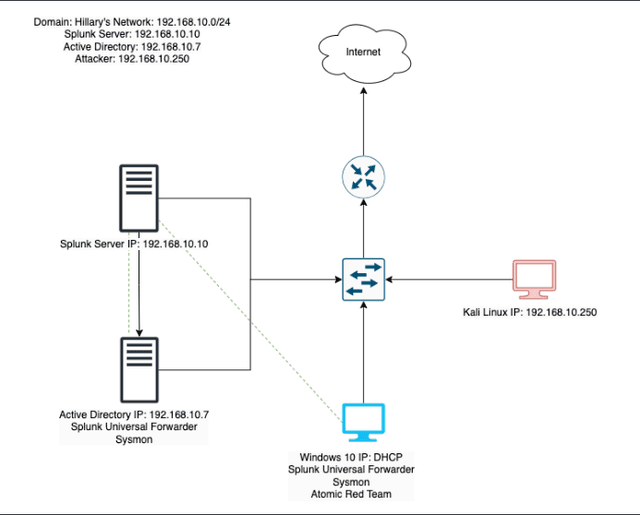
This project involves setting up a home lab environment using VirtualBox to simulate a small Active Directory infrastructure with two Windows 10 machines, a Kali Linux machine for penetration testing, and a Splunk machine for telemetry and log analysis. The environment was configured to simulate security attacks on an Active Directory domain, collect telemetry data, and analyze potential vulnerabilities.

Click here to checkout the blog post
  • active directory
  • windows server
  • GPO
  • powershell
  • splunk
  • crowbar
  • atomic red team
  • ubunto
  • kali linux
  • sysmon

My Skills

Featured Blogs

Here are some of my latest blogs, where I share my thoughts on various topics related to cybersecurity, personal projects, and tech. I hope you find them insightful and engaging! Feel free to leave any feedback by reaching out through the contact form.

Next js image

Building an IAM Home Lab from Scratch

Published on 3/13/2026

IAM Active Directory Entra ID MFA

If you've been following along, you already know I built an Active Directory home lab a while back. Four virtual machines, a Kali Linux attacker box, Splunk ingesting logs, the whole setup. That project taught me how systems talk to each other and what it looks like when they're under attack.

This project is different. Where the AD lab was about understanding how things break, this one is about understanding how access is managed. Who gets in, who gets moved, and who gets the door closed behind them when they leave. That's the world of Identity and Access Management, or IAM.

I've been leaning toward IAM as a career direction because it sits at the intersection of security, automation, and real business impact. Every company, regardless of size or industry, has to answer the same questions: who has access to what, should they still have it, and what happens when they leave? IAM engineers are the ones building the systems that answer those questions at scale. That appeals to me.

This blog series documents how I built a home lab to simulate exactly that, and automated it with PowerShell.

What I'm Building

By the end of this series, I'll have a working lab environment that does the following:

  • A Windows Server Domain Controller running in VirtualBox, with Active Directory managing on-premises users and groups
  • A free Microsoft Entra ID tenant (Microsoft's cloud identity platform) connected via the Microsoft Graph API
  • A set of PowerShell automation scripts that handle the full employee identity lifecycle: onboarding a new hire, updating access when someone changes roles, and cleanly offboarding someone who leaves
  • A GitHub repository documenting everything, written so anyone can follow along and build it themselves

If you're not in tech, think of it this way: every time a new employee starts at a company, someone has to create their accounts, add them to the right systems, and set their permissions. When they leave, someone has to undo all of that. At small companies that's done manually. At larger ones it's automated. I'm building the automation.

The Environment: What You Need

Before writing a single line of PowerShell, you need two things set up: a local server to run Active Directory, and a cloud identity tenant to connect it to.

1. VirtualBox + Windows Server

I'm running VirtualBox on my personal computer, which is the same setup I used for the AD lab. If you followed that project, you're already familiar with the basics.

For this lab, I'm using Windows Server 2022, which you can download as a free 180-day evaluation directly from Microsoft. No license needed. It's the same full version, just time-limited, which is more than enough for a home lab project.

The Windows Server VM will be promoted to a Domain Controller, meaning it's the central authority for the entire local network. It handles authentication, stores user accounts, and enforces group policies. In a real enterprise, this is the system that decides whether your login attempt is valid when you open your laptop on Monday morning.

Minimum specs for the VM:

  • 2 CPU cores
  • 4 GB RAM
  • 50 GB storage

If your machine is tight on resources (I've been there), you can drop to 2 GB RAM and it'll still work. It'll just be slower.

2. A Free Microsoft Entra ID Tenant

Entra ID is Microsoft's cloud-based identity platform, formerly called Azure Active Directory. It's what sits behind every Microsoft 365 login, and it's one of the most widely deployed identity platforms in enterprise environments today.

The good news: you get a free Entra ID tenant with any Azure account, and Azure has a free tier. You don't need to pay anything. Head to portal.azure.com, sign up with a personal Microsoft account, and you'll have a real Entra ID tenant to work with.

This is where the cloud side of the project lives. While Active Directory manages on-premises users, Entra ID manages cloud identities, and Microsoft Graph PowerShell lets us interact with it programmatically. That's exactly what we'll be doing in Phase 4.

Read more
alt text

First Week in IT

Published on 2/16/2026

cybersecurity itcareers careerpivot breakingintoit securityplus helpdesk homelab raspberry pi

Tech had been on my radar for a while, but for the longest time I could not figure out which direction to go. At first software engineering had me intrigued, then the idea of penetration testing felt like the coolest thing in the world. Over time, as I learned more and got a clearer picture of the field, I found myself gravitating toward Identity and Access Management. But before any of that clarity came, I just knew I wanted in. So I made a move.

I was coming from a completely different field when I decided to bet on myself and sit for the Security+. I will save that full story for another post because it deserves its own, but what that chapter taught me more than anything was how to actually learn. Not just how to pass a test, but how to make information stick.

Self studying takes a tremendous amount of grit. I have always been strong academically, rarely settling for anything under an A, always in honors classes. But self studying is a different animal entirely. There is no teacher, no deadline, no one checking on you. So I studied how to study. After discovering spaced repetition I immediately understood why teachers assigned readings before covering material in class and why homework was given daily. It all clicked. After finishing anything new I would close my notes and repeat back to myself exactly what I had just learned. I became very intentional about it. I did not want to just pass a test. I wanted the material to actually stick.

None of that prepared me for what came next though. Passing the Security+ did not open the doors I expected it to. Throughout that year I had already begun applying, so the job market was humbling me in real time. The rejections were constant, sometimes not even a response at all, just silence. It got to me. There is only so many times you can put yourself out there before you start questioning whether you are on the right path.

Eventually I regrouped. I had already built out an Active Directory home lab shortly after passing my Security+ to make sure I was not just studying theory but actually getting hands on with the tools. I also put together a Raspberry Pi travel router with a VPN for a trip I had coming up to Peru, which sounds like a fun side project but honestly it was just another excuse to keep building and stay sharp.

Those projects kept me sane during the rejection period. I then finished a Udemy course on IT support technician skills, tweaked my resume, and started applying again at 2 AM. I told myself that this time rejection was not going to knock me off my pivot.

That following morning at 11 AM I got a message on Indeed from a company asking to meet. We scheduled the interview for Friday, which gave me three days to prepare. I made a list of common entry level IT questions and studied them thoroughly. I recorded myself doing mock interviews, asking and answering questions out loud, watching myself back. It felt ridiculous. It worked.

Friday morning I was buzzing. Not just nervous but genuinely grateful. Someone was giving me a chance. Even if I did not get the job, I had made it to an interview and that meant something. The hiring manager and I hit it off immediately. The conversation went from my home lab to gaming without missing a beat. By the end of the call he told me he liked how I articulated myself and that I would be hearing back. I was elated. A new fire burned in me, not just because I had proven myself to them, but because I had proven something to my toughest critic. Myself.

My first week on the job was electrifying and I mean that literally, not as a hyperbole. Seeing the tools I had studied in my home lab being used in a real environment was incredible. Active Directory, Exchange Admin Center, Microsoft 365, Jira. I had touched all of these before. Then they brought in Barracuda, Cisco Endpoint Antivirus, Cisco Umbrella, and Cisco Unified CM Administration. I had always heard how intimidating Cisco products were, how brutal the CCNA is. But sitting in front of those tools that first week I realized they were not as frightening as I had built them up to be. Unknown territory can feel like standing at the edge of a cliff. The difference is whether you lean in or step back.

My first real task was setting up a new hire, which turned out to be the perfect introduction because it touched almost every tool at once. Creating mailboxes in Exchange Admin Center, assigning licenses in Microsoft 365, configuring permissions in Active Directory, setting up phones in Cisco Unified CM Administration. I was not overwhelmed. I was hungry for more. My team was incredibly supportive and wanted to ease me in slowly given it was my first professional role in tech. I appreciated that. But I wanted to get into tickets.

Which brings me to my first mistake.

I am a big note taker. Always have been, to the point where I used to sell my notes in college. Notes are my safety net. Being able to refer back to them at any step keeps me grounded and reduces my anxiety. So naturally my first mistake came from not referring to my notes. Ironic, I know.

An end user requested email forwarding. Simple enough. Instead of forwarding their emails to their supervisor I added their entire mailbox to their supervisor's account. Not the same thing at all. The supervisor came back saying they had not received any emails and I was immediately embarrassed. How did I fumble something so straightforward? But that embarrassment was useful. I learned why it matters. Adding a mailbox that way can cause it to crash entirely, which thankfully did not happen here, but understanding the why behind the mistake made it stick in a way that just reading about it never would have. I went back to my notes after that. I have not skipped them since.

Mistakes like that are actually what keep me going. There is something about getting something wrong in a real environment, with real consequences, that makes you want to understand things on a deeper level. It is a different kind of motivation than studying for a cert. It is personal. I am now setting my sights on the SC-300 and want to get serious about PowerShell scripting. The more I learn the more I realize how much there is still ahead of me, and honestly that does not intimidate me the way it used to. If anything it feels like exactly where I am supposed to be.

Read more
Rasberry Pi 4

Rasberry PI Travel Router/VPN

Published on 10/1/2025

raspberry pi 4 hostapd dnsmasq openvpn wireguard pihole docker

For my trip to Peru, I transformed my Raspberry Pi into a secure travel router by installing hostapd and dnsmasq to broadcast a protected hotspot, and wired it to start OpenVPN or WireGuard at boot. Whenever I arrived at my hotel, I simply connected the Pi to their Wi‑Fi, enabled the VPN, and then had all my devices, phone, laptop & iPad join my secure network. This layered setup ensured all traffic was routed through the encrypted tunnel . I loved how it unified protection across devices, bypassed captive‑portal annoyances, and kept DNS requests and browsing private. The biggest challenge was initial setup: configuring firewall rules, installing drivers for USB Wi‑Fi adapters, and occasional troubles with captive portals . With those overcome, I gained dependable privacy and performance, no subscriptions, full control, and confidence when browsing on the go.

Read more
Active Directory Lab Diagram

Active Directory Lab

Published on 7/21/2025

Oracle VM VirtualBox Manager Active Directory Crowbar Sysmon Kali Linux Splunk PowerShell

From Theory to Practice

Theory only gets you so far, especially in the cybersecurity field. Without application, it’s easy to feel like an imposter. Studying for my Security + gave me a solid foundation. I learned what a SIEM is, but I didn’t truly understand how to work with logs in a platform like Splunk until I started exploring it myself. That realization pushed me to build a home lab where I could apply what I’d learned in a safe, controlled environment.

I also know how competitive the job market is, and how often employers prioritize experience over potential. I believe in my ability to learn anything I set my mind to, but I understand that belief alone isn’t enough. That’s why this lab is more than just a personal project. It’s my way of showing, not just telling, what I’m capable of.

Inside the Lab

This project involves setting up a home lab environment using a virtual machine (VirtualBox in my case) to simulate a small Active Directory infrastructure. My VirtualBox consisted of 4 machines: two Windows 10 machines, a Kali Linux machine for penetration testing, and a Splunk machine for telemetry and log analysis. The environment was configured to simulate security attacks on an Active Directory domain, collect telemetry data, and analyze potential vulnerabilities. Essentially, these tools will give me the ability to explore both sides of cybersecurity: offense and defense, attack and response.

What I Wanted to Learn

The main goal of this lab was to understand how different systems interact. I wanted to see how I could launch an attack using Kali Linux as a red teamer, and then switch perspectives to detect and analyze that same attack as a blue teamer. I also wanted to explore Active Directory by practicing IAM, setting user permissions, and simulating common help desk scenarios. I wasn’t trying to fully simulate a corporate network (not yet). This project was about exploring how cybersecurity, system administration, and hands-on problem-solving all connect in the real world.

The Wins & Challenges

The rumors are true! Following through on what you said you’d do really does help ease imposter syndrome. As a lifelong learner, there’s something deeply rewarding about finally getting hands-on with the tools I used to only read about. It’s the kind of momentum that makes me want to keep building.

I combined “Wins & Challenges” into one section because, to me, every challenge is an opportunity to learn, which I count as a win.

One of the first challenges I faced was performance. My virtual machines were lagging badly. I’m working with an older computer that doesn’t have much storage, so I decided to invest in an external SD. After researching how to safely move all my VirtualBox files to external storage, I finally got everything running more smoothly, and freed up space to continue expanding my lab environment in the future.

Another challenge was configuring a static IP for my Splunk server. By default, VirtualBox assigns dynamic IPs, which means a machine’s IP address can change every time it restarts. That causes problems for systems trying to talk to each other. Setting static IPs not only makes communication between machines consistent, but it also simulates how networks are built.

For Splunk, I ran into an issue where the configuration file I had didn’t match the one used in the tutorial I was following. As a result, my static IP wouldn’t persist after rebooting, it kept reverting to DHCP. After digging through Stack Overflow and Reddit, I learned I needed to create a custom network interface and bind it to the static IP. It took some trial and error, but I eventually got it to stick across reboots.

That moment, when it finally worked, meant more than just solving a networking issue. It reminded me that tutorials can only take you so far. Systems evolve, documentation gets outdated, and eventually, you have to rely on your own ability to troubleshoot. I genuinely believe that the best learning happens when you can’t find an exact guide, and you figure it out anyway.

That feeling? That’s a win.

Looking Forward

I’m excited to keep building on the foundation I’ve laid with this home lab. One of my next goals is to integrate cloud services with either Azure or AWS to create a hybrid environment. I’m also currently learning Python with the hope of automating some of the repetitive processes in my setup.

This project has given me a solid starting point, and I’m proud of how far it’s come, but I know there’s still so much to explore. I’m always open to any suggestions, feedback, or ideas to help me grow this lab or figure out what to build next.

If you’d like a more in-depth, step-by-step guide on how to set everything up, feel free to take a peek at my GitHub.

Read more
The Cuckoo's Egg by Cliff Stoll

The Cuckoo's Egg by Cliff Stoll

Published on 5/4/2025

book review cybersecurity threat detection incident response

If you have not read The Cuckoo's Egg and want to, stop reading this right now and just go do it. Seriously. Come back after. For everyone else, the short version is that Cliff Stoll, an astronomer turned sysadmin at Lawrence Berkeley National Laboratory, notices a 75 cent accounting discrepancy and ends up tracking a hacker across international networks for months. That is the whole plot. And it is one of the most gripping things I have ever read.

What stuck with me the most is how relevant everything still is. The fundamentals of what Stoll was dealing with in 1986, unauthorized access, lateral movement, persistence, and trying to get anyone in authority to actually care, are the same fundamentals we deal with today. The technology looks different but the game has not changed.

What really hit me though was Stoll himself. This man was not a security professional. He had no SOC, no SIEM, no IR playbook. He was literally sleeping under his desk so he could be there when his homemade alerting setup went off. He was manually correlating logs and building a full picture of the attacker through sheer persistence and intuition. No vendor. No team. Just him, the logs, and an obsession he could not shake.

I was still in the studying phase when I read this, just getting my footing in cybersecurity, and it genuinely shifted how I thought about the field. We talk a lot about tools and certifications when we are starting out, and for good reason. But this book reminded me that the foundation of all of it is curiosity. The willingness to pull on a thread even when nobody else thinks it is worth pulling.

That is what Stoll had. No vendor. No playbook. Just a question he refused to drop, even if it started with 75 cents.

If you are studying for your first cert or just starting to find your way into this field, read this book. It will inspire you in ways you were not expecting.

Read more

My Experience

Contact Me

Feel free to reach me directly at hilaryrobles96@outlook.com or through this form.